

Building the running order
Open a set list from the band’s Set lists section. On a set list you can:
- Add songs — search your band’s library and click a song to append it. You can attach a note as you add (e.g. “Capo 3”). Songs already in the running order are marked In the list, with Add again + in place of Add + — a repeat is allowed, it just isn’t a surprise.
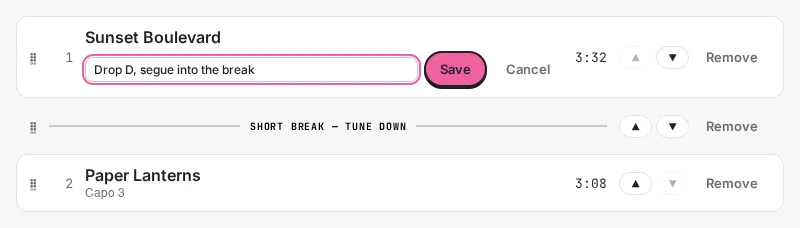
- Add breaks — insert a stop in the set with the + Break button. Whatever is in the note field becomes the break’s label (e.g. “Short break — tune down”, “intermission”); leave it empty for a plain break. Breaks aren’t numbered and don’t count toward the song total.
- Reorder — drag a slot to move it, or use the ▲ / ▼ buttons. The numbers renumber automatically.
- Edit slot notes — click a slot’s note (or + note) to change it in place: per-song reminders like tuning or capo. A break’s label is edited the same way.
- Remove — drop any slot with Remove. The same song can appear in multiple slots; each is independent.
- Rename the set list or edit its description (venue notes, “soundcheck at 6”).
Once the order is right, check it against your slot with timings and the target, and print it for the stage.