

Creating and importing songs
There are two ways to add a song to a band: start a blank one from an instrument template, or import an existing file. Both start from the + New song button in the song library.
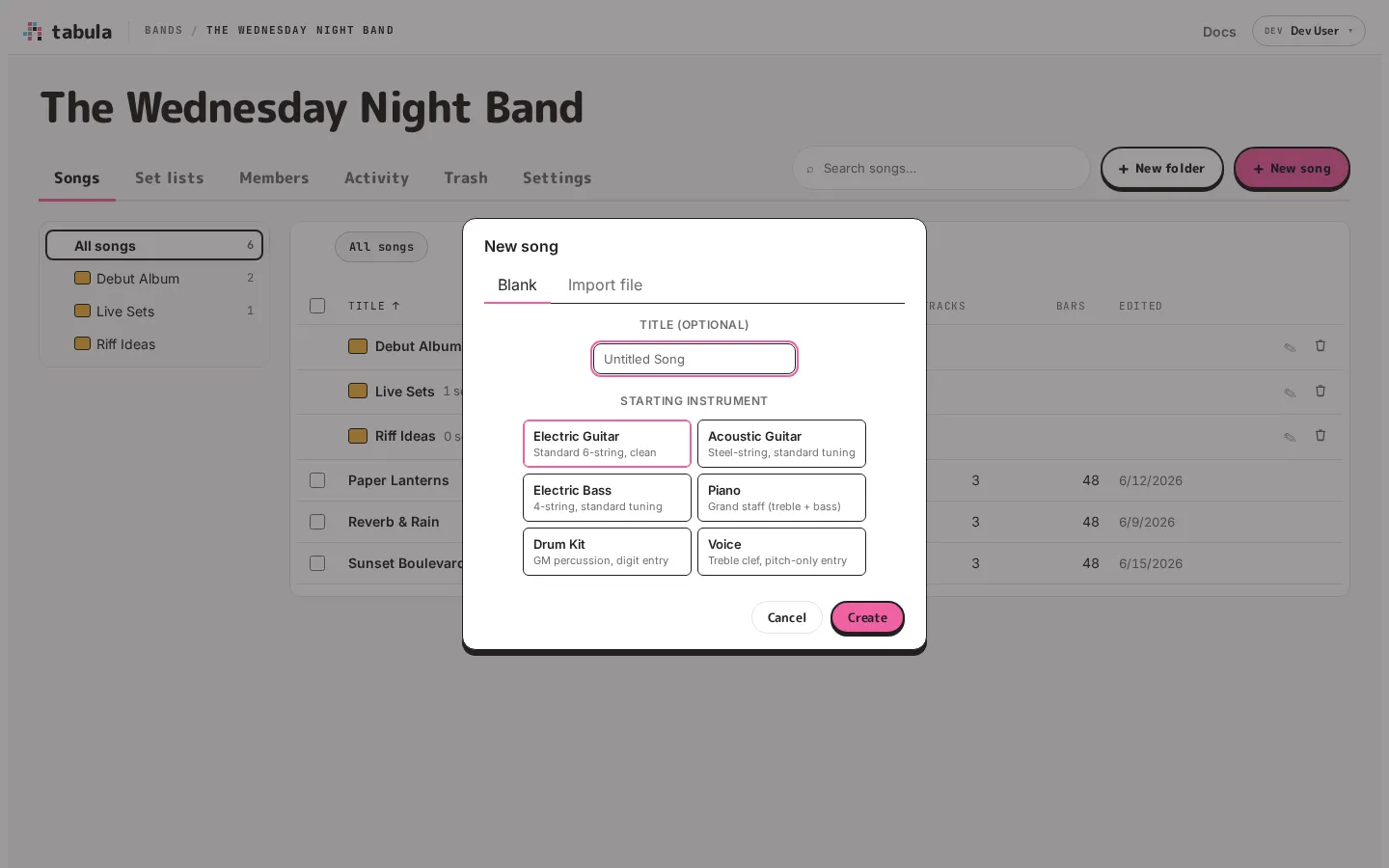
Starting a blank song
Section titled “Starting a blank song”On the Blank tab, optionally give the song a title, then pick a starting instrument:
- Electric Guitar — standard 6-string, clean
- Acoustic Guitar — steel-string, standard tuning
- Electric Bass — 4-string, standard tuning
- Piano — grand staff (treble + bass)
- Drum Kit — GM percussion, digit entry
- Voice — treble clef, pitch-only entry
Click Create and Tabula opens the new song in the editor with that instrument ready to play. You’re not locked in — you can add more tracks, change tunings, and adjust the instrument afterward.
If you leave the title blank, Tabula names the song with the date so it’s easy to find and rename later.
Importing a file
Section titled “Importing a file”On the Import file tab, choose a file. Tabula reads Guitar Pro 3 and later (.gp3, .gp4, .gp5, .gpx, .gp), MusicXML (.musicxml, .xml, .mxl), and Tabula’s own native format (.nsf / .json). It shows a preview of the import, so you can check it before committing. Confirm the title and import, and the song opens in the editor.
If the file has detail Tabula can’t show yet, the preview says so — for example, that a few bits of detail Tabula can’t show yet (grace and cue notes, unusual percussion mappings, and the like) were read but won’t appear. The notes and structure still come through. And if the file can’t be read at all, the message leads with that — “We couldn’t read that file. It may not be valid MusicXML, Guitar Pro or an NSF export.” — with the parser’s detail after it for anyone who wants it.
Guitar Pro files
Section titled “Guitar Pro files”A Guitar Pro file comes across with its tracks, tunings and capos, bars and repeats, tempo and key changes, sections, chord names, lyrics, the song’s details (artist, album, composer, lyricist, copyright, and a “Tab by” credit for whoever transcribed it), and the playing techniques Tabula has — bends (drawn and played as their full curves, so a release or pre-bend keeps its shape), slides in and out, hammer-ons and pull-offs, ties, vibrato, harmonics, palm mutes, let ring, dead and ghost notes, accents, staccato, tremolo picking and dynamics. Drum parts come across hit by hit, as General MIDI drums.
Where Guitar Pro has something Tabula doesn’t, the preview lists it by name with a count, and says what happens to it. Most are left out — grace notes, whammy-bar dives, pick slides, trills, fingerings, chord diagrams (the chord name stays). A few are rewritten so the timing stays exact: a double-dotted note becomes a dotted note tied to the rest of its length, and a note shorter than a 32nd is written as a 32nd in a tuplet. A tempo change in the middle of a bar moves to the nearest barline.
Older files — Guitar Pro 3, 4 and 5 (.gp3, .gp4, .gp5) — come across too. They have no instrument of their own beyond a sound, so a part is named by the sound it plays: a flute part becomes a flute, a guitar part a guitar, exactly as Guitar Pro itself reads them.
A file from Guitar Pro 1 or 2 (.gtp, last written in 1999) says so rather than failing vaguely: open it in any newer Guitar Pro and save it again.
Importing a whole library
Section titled “Importing a whole library”Choose as many files as you like at once. Tabula reads them all first and lists what it found — one line per file, with the ones it can’t read named and the reason beside them — so you confirm once rather than file by file. Under the list is everything the selection drops, added up across all of it.
Before importing, choose where they land: the folder you started from (or the band’s top level), or a new folder you name inside it. Two files with the same song title come in as two songs; nothing is merged or skipped on your behalf.
A band holds 500 songs, so a library bigger than that needs more than one band. If a band fills up (or your storage does) part way through, the import stops there and says so, and the songs already imported stay.
Coming from another editor
Section titled “Coming from another editor”You don’t need Guitar Pro to get a song in. TuxGuitar saves Guitar Pro 3, 4 and 5 files and exports MusicXML, and MuseScore, Sibelius, Finale and Dorico all export MusicXML — any of those comes straight in. From an editor not listed here, MusicXML is the export to look for.
Where new songs land
Section titled “Where new songs land”New and imported songs land in the folder you have open when you choose New song — the band’s top level if you’re not in one. The dialog says which folder under its title. Move them afterward if you like.
Duplicating a song
Section titled “Duplicating a song”To copy a song, open it and choose Duplicate This Song… — from the Song menu, or the command palette (Ctrl+Shift+P). You get an independent copy in the same band, with its own title, that you can edit without touching the original.