

Song structure
Beyond the notes themselves, Tabula gives you full control over a song’s shape — its measures, signatures, tempo map, repeat structure, named sections, and the instruments that play it.
Measures
Section titled “Measures”- Add a bar with the + Bar toolbar button, or just press → at the end of the song. Either way the new bar goes at the end and your cursor moves to it.
- Insert a measure before or after the cursor with Ctrl+I / Ctrl+Shift+I.
- Delete a measure with Ctrl+Delete. The measure is removed from every track at that position.
- Duplicate a bar from the command palette — Duplicate This Bar, or Duplicate This Bar ×4 to lay down four copies at once, which is the quick way to build out a riff you’re going to vary later.
- To insert or remove a single beat, use I (before) / Shift+I (after) and the delete key.
Time signature
Section titled “Time signature”Open the Bar ▾ menu (or the command palette) and choose Time Signature…. The default is 4/4. A time-signature change applies from the chosen bar onward across all tracks, and you can set per-bar overrides (and clear them). With a range selected, it is written to every bar in it — the dialog names the bars it will change.
Key signature
Section titled “Key signature”Also under the Bar ▾ menu. Key signatures run from seven flats to seven sharps and can be major or minor, with per-bar overrides — across the selection when there is one. The key signature drives diatonic pitch stepping when you enter notes with the arrow keys on a notation staff.
- The song’s base tempo (BPM) is shown in the toolbar transport and editable from the Song menu.
- You can set a tempo change at any bar, and create gradual tempo ramps (accelerando / ritardando) across a span of bars — rendered as a tempo line above the staff. Select the bars first and Gradual Tempo Change… ramps across exactly them: with bars 7–8 selected it reads Applies to: Bars 7–8, starts from the tempo already in force, and writes one ramp to the target you type. Playback follows it, slowing down or speeding up smoothly across those bars and arriving at the target by the end of the last one — the same curve a REAPER export writes.
Repeats and endings
Section titled “Repeats and endings”Tabula renders repeat structure and plays it back correctly.
- [ toggles a repeat-start barline; ] toggles a repeat-end barline. With a range selected they bracket its ends — select bars 3–6, press [ then ], and that passage repeats.
- Shift+] / Shift+[ increase / decrease how many times the section repeats.
- Alternate endings (1st-time, 2nd-time bars) and a pickup bar (anacrusis) are available from the command palette.
Courtesy signatures at a repeat target
Section titled “Courtesy signatures at a repeat target”If taking a repeat sends you back into a different time or key signature than the bar you just finished, Tabula prints that signature again at the repeat target — the way a publisher would, and for the same reason: you arrive there from the repeat end, not from the bar before it, so without it there’d be nothing on the page telling you what you’re back in.
You didn’t type it and you can’t delete it. It restates rather than changes, so it appears only where the repeat actually lands you somewhere different, and it matches what playback does — each bar is played in the meter it’s written in, and doesn’t change length just because it’s being replayed.
Sections
Section titled “Sections”Name the parts of your song — Verse, Chorus, Bridge, or just A and B. Each name is drawn above the score at the bar it starts on, travels into MusicXML exports as a rehearsal mark and into a REAPER project export as a timeline marker, and is part of what an assistant reads when it asks for a song’s structure.
Put the cursor in the bar where the part starts and open Section… from the Bar menu (the entry names the current section when there is one, e.g. Section (Chorus)…). Type a name and Apply; Remove section takes the mark off again. You can also do it on the score itself: click an existing label to rename it, or click the faint + section above a bar that has none. (It’s always there; hovering with a mouse brightens it.)
A section is a mark, not a range
Section titled “A section is a mark, not a range”You never set a section’s end. You mark where one starts, and Tabula works out the rest:
- A section runs from its bar to the bar before the next section — or to the end of the song if there isn’t one.
- Marking a bar inside an existing section ends that section just before your new mark. Marking bar 17 in a Verse that ran 9–24 leaves Verse at 9–16 and starts the new one at 17.
- Removing a mark hands its bars back to the section before it, rather than leaving a gap.
That’s why there’s nothing to keep in sync when you insert or delete bars in the middle: the spans follow the marks.
Names are capped at 200 characters, which is far more than a section name needs and enough for the occasional stage direction.
Tracks and instruments
Section titled “Tracks and instruments”A song can hold many tracks. Open the track sidebar from the Tracks button.
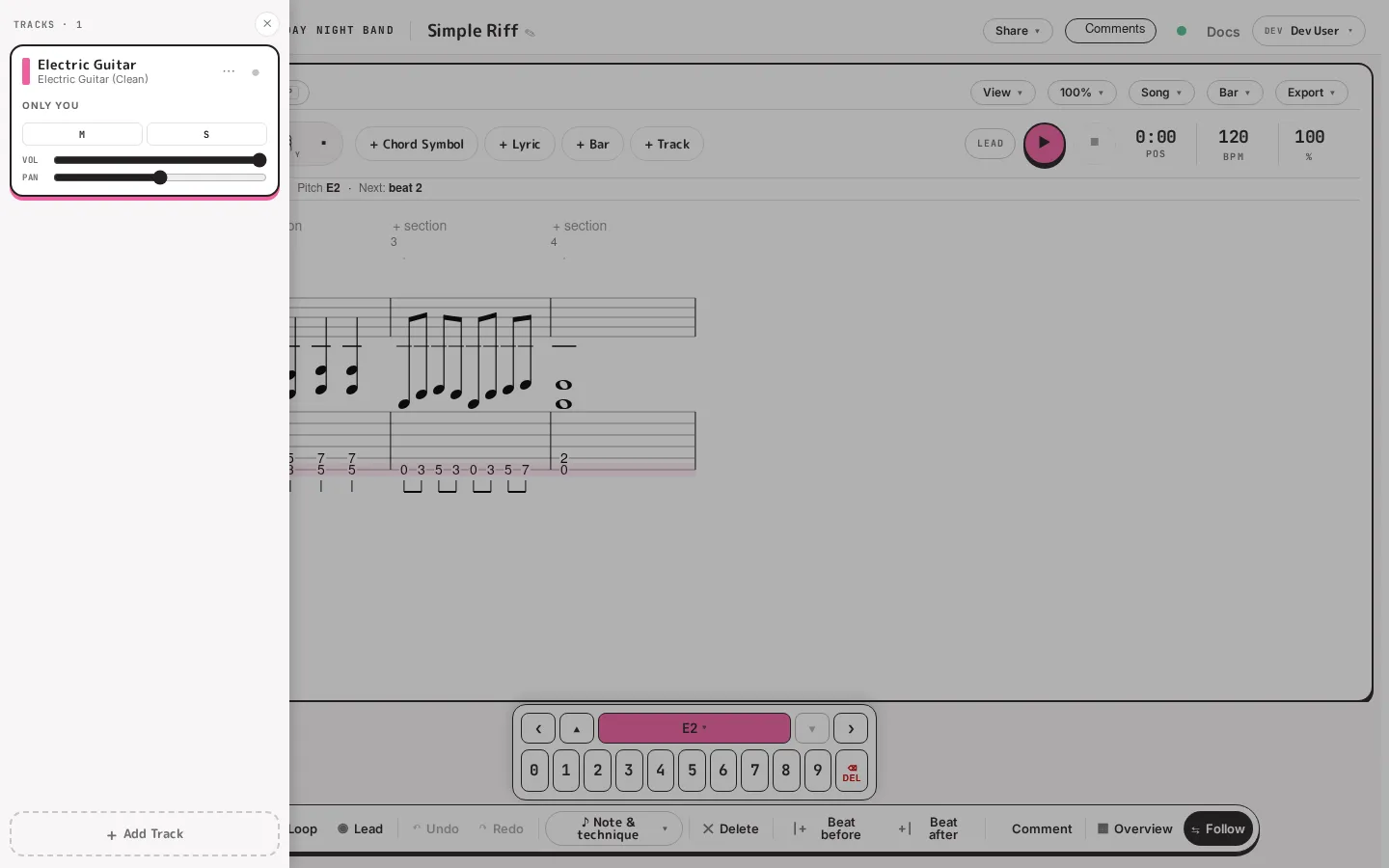
From here you can:
- Add a track (+ Add Track) and pick its instrument — guitar, bass, piano, voice, brass, winds, or drums. Each track starts with the staff that suits its instrument (a tab staff for fretted instruments, a percussion staff for drums), and you can show standard notation, tablature, or both on any track (see the next item).
- Set a track’s name, tuning, capo, and number of voices, and choose whether to show its tab staff, notation staff, or both. Most of this lives in Track Properties…, from the track’s ⋯ menu or the command palette.
- Control the mix per track: M (mute), S (solo), and the volume and pan sliders. These feed playback.
- Hide a track from view without deleting it.
Multi-voice tracks (up to two voices) let you write an independent counter-line — useful for two-part writing on one staff.
Retuning and transposing a track
Section titled “Retuning and transposing a track”Track Properties… is also where you move a part that’s already written — to a different tuning, a different instrument, or a different key.
Retuning
Section titled “Retuning”Change the tuning from the preset dropdown, by editing individual string pitches, or by switching the instrument (which brings in that instrument’s default tuning). As soon as the new tuning differs from the current one, Tabula asks When retuning:
- Keep pitches (re-finger the notes) — the default. Every note keeps the pitch it sounds and gets re-fingered for the new tuning: the same string where it still reaches, otherwise the nearest string at the closest fret. Two notes in one beat never end up on the same string. This is what you want when you’re moving a part to a drop tuning and it should still sound like the same part.
- Keep fingerings (frets stay, pitches follow the tuning) — fret numbers stay exactly where they are and the notes move in pitch with the strings. The shape under your fingers is preserved and the part sounds different.
Transposing
Section titled “Transposing”Set Transpose in semitones, from −24 to +24 in either direction. Notes are re-fingered on the current tuning (or the new one, if you’re retuning at the same time); on pitched tracks without strings — keys, winds, voice — the notes simply move. Transpose is hidden on drum tracks, where it has no meaning.
Tick Apply to all tracks to shift every non-drum track in the song by the same amount, which is how you move a whole song into a singer’s key.
When a note can’t be played
Section titled “When a note can’t be played”Some moves push a note off the end of the fretboard. Whenever a pitch-preserving retune or a non-zero transpose is pending, Tabula previews the damage before you commit — a line like “3 notes move (1 by an octave) · 0 can’t be played” — and lets you choose If a note can’t be played:
- Don’t apply — show me (the default) — Apply stays disabled while any note would be unplayable, and the count tells you how many. Nothing is changed until you’ve dealt with it.
- Remove the note — unplayable notes are deleted. The beat itself stays.
- Move it by an octave — the note is shifted by whole octaves until a string can reach it (up to two), and removed only if that still isn’t enough.
Applying is a single undo step, so Ctrl+Z puts the whole track back the way it was.
Song metadata
Section titled “Song metadata”The Song menu also holds the song’s metadata: title, artist, album, the credit fields (music by, words by, arranged by, copyright), and the song’s opening tempo and key. The title is also editable directly from the top bar. (The time signature isn’t there — it’s a per-bar attribute, set from the Bar ▾ menu above.)