

Entering notes
Tabula is keyboard-first. How you enter a note depends on the instrument: fret numbers on a tab staff, letter keys for pitched instruments, and digit keys for drums. In every case you first arm a duration, then enter the pitch; the cursor advances so you can keep playing.
The location strip above the score always shows where the cursor is, so you never lose your place, and ends with a Next field naming where the next note you type will land (Next: beat 2, or Next: bar 3 once the current bar is full):

When you’re on an empty beat, a faint outline of the armed duration previews the note you’re about to enter, right where it’ll land — it moves with the cursor and updates as soon as you change the armed duration.
Filling an empty bar
Section titled “Filling an empty bar”A bar you haven’t written in yet holds a single bar-long rest. Type into it and the note takes the duration you have armed, not the whole bar: the rest is split, what’s left of it stays behind as rests, and the cursor moves onto the first of them. So an empty 4/4 bar with a quarter armed takes four digits as four beats, with no extra keys and the bar always adding up.
→ does the same thing without writing a note, so you can skip beat 1 and start on beat 2. Once there’s nothing left to split — the last rest of the bar is already the armed length — → moves on to the next bar as usual. Holding → down just walks the cursor; it doesn’t leave slots behind.
Two details worth knowing on a part-written bar:
- Typing splits a rest anywhere in the bar. Land on a half rest in the middle of a written bar with a quarter armed, type, and you get a quarter note followed by a quarter rest — the bar still adds up.
- → only splits at the end of the bar, where everything after the cursor is a rest. Stepping past a rest that has notes after it just moves the cursor, because rewriting the middle of a bar you’ve already written isn’t what you meant by pressing an arrow.
The split also covers a rest entered with N, a chord voicing, a drum piece, and arming a shorter duration while the cursor sits on a rest. A rest that’s already at or shorter than the armed duration is left alone, and so is a beat inside a tuplet.
The buttons labelled Beat ← and Beat → in the beat toolbar are a different thing — they insert a beat before or after the cursor, which makes the bar longer. The arrow keys are what move the cursor.
Guitar, bass, and other stringed instruments
Section titled “Guitar, bass, and other stringed instruments”On a tab staff, type fret numbers directly onto the active string.
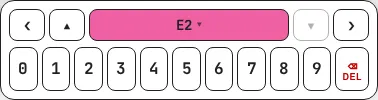
- Type a digit 0–9 to place that fret on the active string.
- For frets 10 and above, type both digits quickly — Tabula buffers the first digit briefly and combines them (e.g.
1then2→ fret 12). If the combined number would exceed the maximum fret (24), the first digit commits on its own. Frets go from 0 to 24. - ↑ / ↓ move the cursor between strings. The location strip shows the active string and its open pitch, e.g. String 6 (E2).
- After you commit a fret, the cursor advances to the next beat (this auto-advance is on by default; you can turn it off under View).
Building chords
Section titled “Building chords”To stack several notes on one beat, switch the cursor to the notation staff with Shift+Tab and press Enter at each pitch — Enter commits the note without advancing, so you can keep adding chord tones to the same beat. Tabula picks a sensible string and fret for each. Press → when the chord is complete.
Nudging pitch
Section titled “Nudging pitch”- Alt+↑ / Alt+↓ nudge the selected note up or down by one semitone.
- Add Shift (Alt+Shift+↑/↓) to move by a full octave.
Piano, voice, winds, and other pitched instruments
Section titled “Piano, voice, winds, and other pitched instruments”Instruments without strings (piano, voice, brass, woodwinds, strings) are entered on the notation staff with letter keys:
- Press a pitch letter A–G to place that pitch. Tabula uses the nearest octave to the cursor (the same rule as MuseScore): if the cursor is near C4, pressing
Cgives C4; move up to G4 and pressCagain and you get C5, the nearer C. - ↑ / ↓ step the cursor up and down the scale diatonically, respecting the song’s key signature.
- Alt+↑/↓ move chromatically by a semitone; add Shift for an octave.
- Press Enter to stack chord tones on the current beat without advancing.
Piano and organ use a grand staff (treble + bass). Move between the two staves with Ctrl+↑ / Ctrl+↓.
On a drum track, the digit keys 1–9 map to kit pieces:
| Key | Piece | Key | Piece | Key | Piece |
|---|---|---|---|---|---|
1 | Kick | 4 | Open hat | 7 | Tom 1 (high) |
2 | Snare | 5 | Crash | 8 | Tom 2 (mid) |
3 | Closed hat | 6 | Ride | 9 | Tom 3 (floor) |
- A plain digit toggles that piece on the current beat — press it again to remove it. Because drum beats are usually chords (kick + hat, snare + hat), plain digits stack on the same beat without advancing.
- Shift+digit stamps the piece and advances to the next beat — handy on sparse lines like a four-on-the-floor kick.
- ↑ / ↓ walk the cursor up and down the staff lines; Enter stamps the canonical piece for the current line.
Press N to enter a rest of the armed duration. The cursor advances just like a note.
Moving the cursor
Section titled “Moving the cursor”Navigation works the same on every instrument:
| Action | Keys |
|---|---|
| Previous / next beat | ← / → |
| First / last beat of the measure | Home / End |
| Previous / next measure | Ctrl+← / Ctrl+→ |
| Previous / next track | Page Up / Page Down |
| Switch between tab and notation staves | Shift+Tab |
| Move between staves of a grand staff | Ctrl+↑ / Ctrl+↓ |
Inside a bar you haven’t filled yet, → steps one armed duration at a time (see Filling an empty bar); ← walks back through the slots that are already there. Pressing → at the end of the song appends a new bar, so you can keep playing without stopping to add measures.
Next: choose how long each note lasts in Rhythm and durations.