

Songs and folders
Each band has a song library — the page you see when you open the band. It’s where your songs live, optionally grouped into folders.
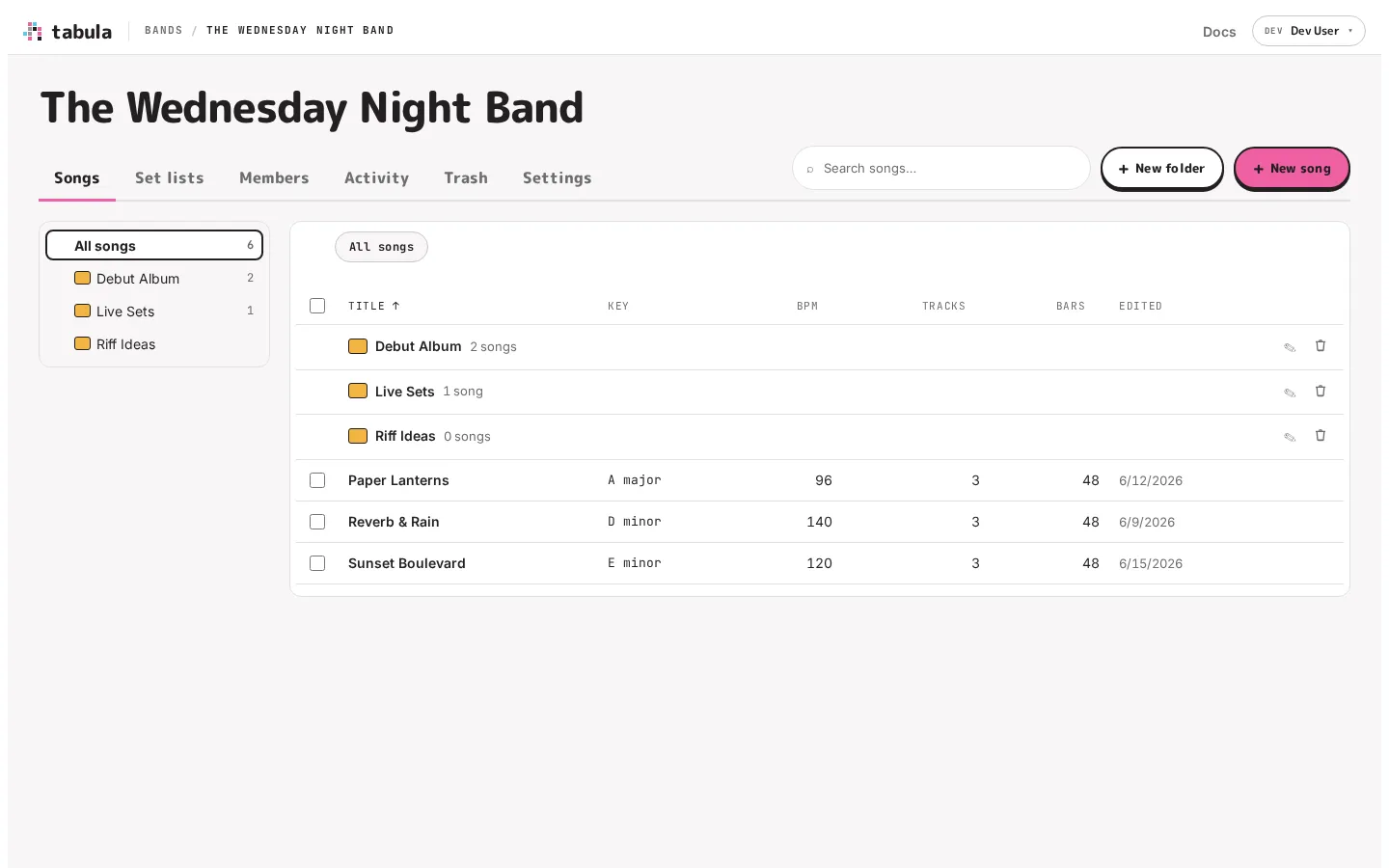
The library
Section titled “The library”At the top are the band’s name and its sections: Songs, Set lists, Members, Activity, Trash and Settings. On Songs, the bar also holds a search box and the + New folder and + New song buttons. Below them the page has two parts:
- The folder tree, on the left, shows every folder in the band and how many songs each holds, counting the folders inside it. All songs at the top is the band’s top level. Click the arrow beside a folder to show the folders inside it.
- The open folder, on the right, lists its folders first and then its songs, one row each: title, key, tempo, track count, bar count, and when it was last edited.
Click a song’s title to open it in the editor. Click a folder, in the tree or the list, to open it. Click a column heading to sort by it, and click it again to reverse the order. Songs start out sorted by title, and whichever order you pick is remembered in this browser, for every band.
On a phone there’s no room for the tree beside the songs. Tap the folder name above the list to open the tree, then tap a folder to go there.
What you see depends on your role: a viewer gets the songs and folders to open and read, without the create, move and trash controls that would only be refused.
Folders
Section titled “Folders”Folders work like folders on your computer — a song lives in exactly one of them (or at the top level).
- Create one with + New folder.
- Navigate by clicking a folder in the tree or the list. A breadcrumb above the songs shows where you are and lets you click back out.
- Rename or delete a folder with the buttons on its row in the list.
- Folders can be nested several levels deep, which is plenty to organize an album, live sets, and a pile of riff ideas.
Deleting a folder is non-destructive to your music: any songs inside it simply move back to the top level rather than being deleted.
Moving songs
Section titled “Moving songs”To move a song into a folder, either:
- Drag its row onto any folder in the tree, onto a folder in the list, or onto a breadcrumb. Hold it over a closed folder in the tree for a moment and the folder opens, so you can reach the folders inside it. Or
- use the song’s Move to… button (the folder icon at the end of its row) to pick a destination. Once there are more than a few folders you can search them by name, and the folder you used last is offered first.
After a drag, a note says what moved and where, with Undo to put it all back.
Moving several at once
Section titled “Moving several at once”Tick the checkbox beside each song you want. To pick a run of songs, tick the first and Shift-click the last. The box in the heading picks every song shown. A bar above the songs counts what you’ve picked: drag any of them onto a folder to take them all, choose Move to…, or Clear to start again. It’s the quick way to sort a library you’ve just imported.
On a phone, press and hold a song to start picking. While anything is picked, tapping a song adds or removes it instead of opening it.
If a song can’t be moved, you’re told how many didn’t make it and why; the ones that moved stay moved.
Searching
Section titled “Searching”The search box filters the songs by title as you type — instant, no waiting — across every folder, with each result saying which folder it’s in. It’s the quickest way to find a song in a large library, and to gather songs from all over the band: search, pick them all with the heading’s box, and move them together.
Renaming and deleting songs
Section titled “Renaming and deleting songs”- Rename a song by editing its title in the editor’s top bar.
- Delete a song with the trash icon at the end of its row. This is a soft delete — it goes to the band’s trash, not gone for good. You get a brief Undo option right after, too.
The trash
Section titled “The trash”Deleted songs go to the band’s Trash, where they can be restored for 7 days. After that they’re deleted for good, automatically. Anyone who can edit may move a song to the trash; restoring is an owner/admin action. Deleted takes land here too, under the same rules.
How much you can store
Section titled “How much you can store”A song and an account each have a size ceiling, and you can own up to 50 bands. The numbers are set well above real music and you’re unlikely to meet them — see Storage and limits for what they are and what to do if you do.