

The drum grid
A drum part can be written two ways in Tabula. Notes is the percussion staff described in Entering notes — you type kit pieces onto a staff, the way you’d write any other instrument. Grid is a step lattice: a row per kit piece, a column per step, and a hit is a square you click.
Both edit the same music. The grid isn’t a second copy of the part or a different file format — it’s another way of drawing the beats that are already there, so you can switch back and forth and lose nothing.
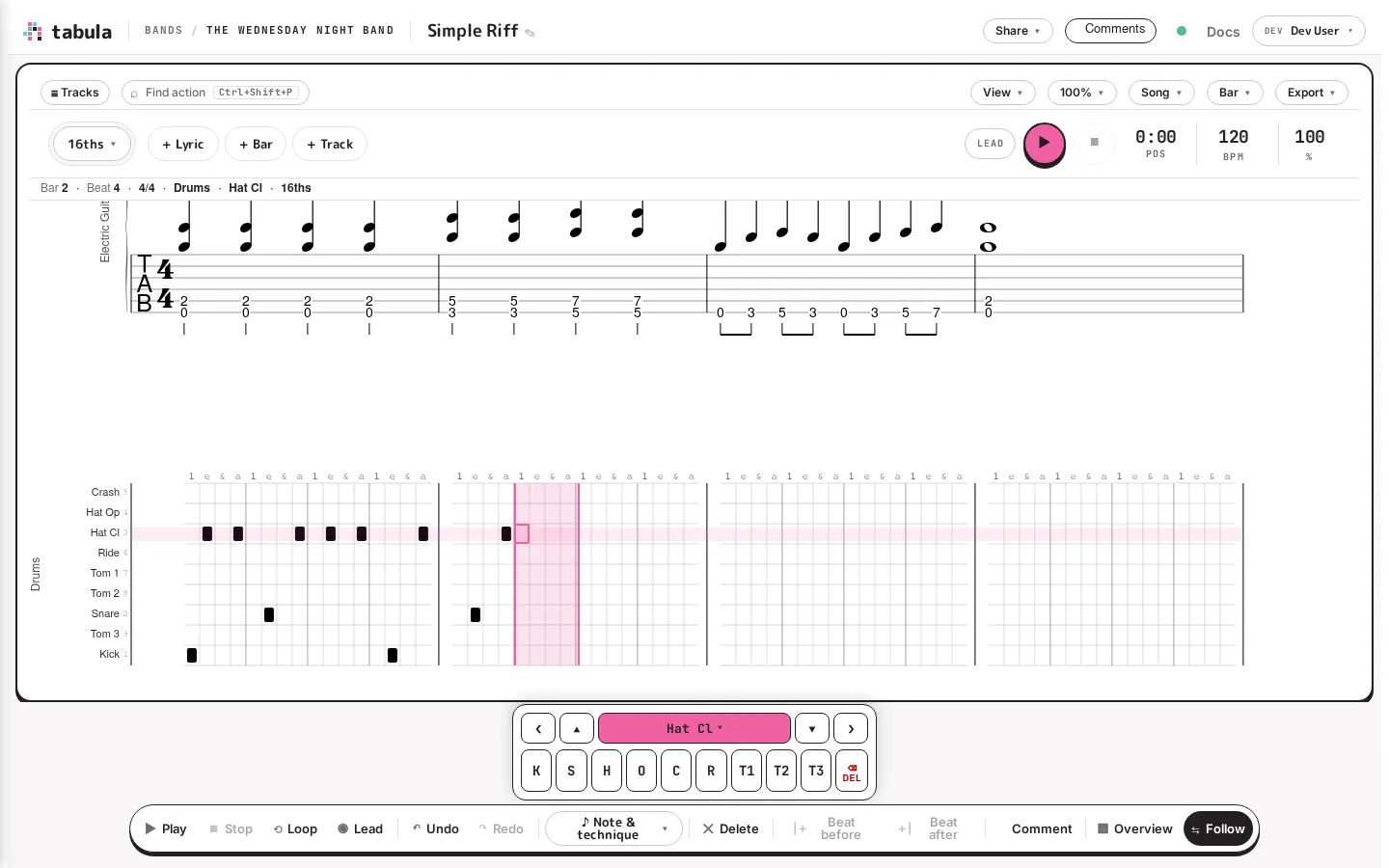
Reading the picture: a row per kit piece down the left, the bar’s steps across, and a ruler along the top counting them out (1 e & a). The chip at the left of the toolbar — 16ths ▾ above — is the armed subdivision. The location strip tells you where the cursor is in the grid’s own terms: Bar 2 · Beat 4 · Drums · Hat Cl · 16ths. The on-screen entry pad swaps its fret digits for kit pieces.
Switching between them
Section titled “Switching between them”A drum track you add now starts in the grid — empty clickable cells rather than an empty staff. Drum tracks that already existed are left exactly as they were; nothing rewrites a part you wrote before the grid existed.
To change a track either way, the Grid / Notes switch lives in three places, whichever is nearest:
- on the track’s card in the track sidebar,
- in Track Properties…, under Drums,
- in the command palette (Ctrl+Shift+P) as Drum grid: switch to Grid / Notes.
The switch only appears on percussion tracks. There’s nothing to show on a guitar part.
Writing hits
Section titled “Writing hits”Click a cell to put a hit there; click it again to take it away. That’s the whole interaction — a press toggles, it doesn’t cycle through weights, so the commonest thing you do costs one press rather than four.
From the keyboard, the grid rebinds most of the editor’s navigation, because you’re moving through cells rather than beats.
The grid has a cell cursor of its own — the ring around one square — and it has to be asked for, so that tabbing through the editor doesn’t quietly arm an edit target. An arrow places one, on the bar’s first cell and the kit line the cursor is already on. So does the first thing you write: 1 as your very first keystroke puts a kick on the downbeat, because a digit names its own row. The keys that only edit a cell that already exists — Backspace, Delete, Home, End, Page Up, Page Down, Esc — stay the editor’s until there is one.
| Keys | Action |
|---|---|
| ← → ↑ ↓ | Move by cell (and place a cell cursor, on the kit line you’re on, if there isn’t one yet) |
| Ctrl+← / Ctrl+→ | Previous / next beat — a whole beat, not one column |
| Home / End | The bar’s first / last cell |
| Page Up / Page Down | The same cell in the previous / next bar |
| Enter | Write the cursor row’s piece and advance (placing a cell cursor first, if needed) |
| Shift+Enter | Write without advancing — how a kick and a hat land on one step (placing a cell cursor first, if needed) |
| 1–9 | Write that row’s piece and advance (placing a cell cursor first, if needed) |
| Shift+digit | Write that row’s piece without advancing (placing a cell cursor first, if needed) |
| Backspace | Clear the cell; on an already-empty cell, clear the one behind |
| Delete | Clear the cell in place |
| Shift+F10 (or the Menu key) | Open the weight sheet — ghost / accent this cell |
| Esc | Drop the cell cursor; the grid stops taking keys |
How long a step is
Section titled “How long a step is”The armed subdivision decides how finely the grid divides a beat — what a click or Enter writes. Set it from the chip at the left of the toolbar (16ths ▾), or from the keyboard. The keys are the same home-row ones the duration palette uses, but in the grid they arm a subdivision rather than a note value:
| Key | Arms |
|---|---|
| E | Quarters |
| R / Shift+R | 8ths / 8th triplets |
| T / Shift+T | 16ths / 16th triplets |
| Y / Shift+Y | 32nds / 32nd triplets |
A value the current bar’s meter can’t divide isn’t offered: it’s greyed out in the chip’s menu, and its key does nothing. Arming it would light the chip up for a value every click then ignored. (A 5/16 bar’s beat is a sixteenth, so it has no sixteenth-triplet division to write into.)
Subdivision is per beat, not per bar. Each beat is drawn in as many columns as its own content needs, so a straight groove with a triplet fill on beat 4 is four columns, four, four, three — not a bar that has to pick one resolution and refuse the other.
Ghosts and accents
Section titled “Ghosts and accents”A hit has a weight: ghost, normal, or accent. Because a press toggles rather than cycles, weight has its own control — long-press a cell on a touch screen, right-click it with a mouse, or press Shift+F10 on the keyboard, and pick from the sheet that opens.
These aren’t decoration: ghost and accent are separate glyphs in notation and they carry through to playback.
Standard drum-set notation writes the bass drum and the pedal hi-hat as a downstem voice below the hands. Tabula follows that: a bar written with a feet lane keeps its kick down there, and clicking the kick row edits that lane rather than stamping a second kick among the hands.
The grid never creates a feet lane. A part that keeps its kick with everything else keeps it there — switching to the grid won’t restructure a chart you already have.
Bars longer than their time signature
Section titled “Bars longer than their time signature”A bar can hold more music than its time signature allows — most often after you change the time signature of a song that already has drums in it, say from 4/4 to 6/8. The grid still draws that bar: the beats the time signature holds, then a dashed barline, then the extra beats past the barline, shaded. Every hit stays where it was, and you can click it to clear it or change it like any other. A note that now crosses one of the new beat lines (a quarter note in 6/8, say) stays as written: a click on its hit changes just that note, and a new hit inside it ends it there. The bar is tinted as over-full, as it is in notation, until it fits again. Tabula never adds or removes time to make it fit — that’s yours to decide — and playback plays the bar for its time signature’s length, skipping the notes past the barline.
When the extra music ends partway into a beat, the columns after it are shaded deeper: there is no written time there to put a hit in. In a bar with a separate feet line, each row is shaded from where its own line’s music ends (or from the barline, if that comes later), so if the hands run past the barline and the feet don’t, the feet rows past the barline are shaded deeper.
Bars the grid won’t draw
Section titled “Bars the grid won’t draw”Some beats and bars can’t honestly be drawn as a lattice, and Tabula declines them rather than rounding your music to fit. A declined beat or bar keeps its place in the grid, shaded, with a short label saying why (tuplet, mixed, shared piece, too many voices) and which pieces it holds. With the grid cursor on it, the location strip above the score spells the reason out:
- off-grid (unsupported tuplet) — one uniform tuplet the grid has no column count for.
- off-grid (mixed subdivisions) — two subdivisions in one beat that no single count can hold, like a sixteenth against an eighth-triplet.
- off-grid (a piece is in both voices) — the whole bar: its second voice plays a piece the first voice also plays, so one cell would mean two notes. A second voice of different pieces, like a separate feet line, draws fine.
- off-grid (more than two voices) — the whole bar: the grid has one row per piece, so it can’t show which of three voices a hit belongs to.
Nothing is lost and nothing is moved. A note nudged to the nearest column would be the worst possible outcome, so it never happens.
You can also read any single bar as notation on purpose: put the cursor in it and click Show as notes in the location strip (then Show as grid to put it back). That’s a reading aid for you, not a change to the music.
When the grid suits you
Section titled “When the grid suits you”The grid is faster for programming a groove — a pattern of sixteenths across kick, snare, and hat is a handful of clicks, and the lattice makes the pattern visible in a way a staff doesn’t. The staff is better for reading, for anything rhythmically irregular, and for handing a part to someone who reads notation.
They’re the same part either way, so use whichever fits what you’re doing and switch when it changes.